





- Top
- WiFi & Connectivity
- How to Connect
How do I connect my smartphone or tablet to the WiFi?
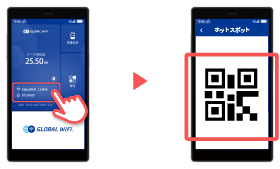
Method 1: Connect to WiFi using a QR code
① Turn on the WiFi router and tap the area outlined in red to display the QR code.
Method 2: Connect using the SSID and password
① Go to Home Screen > Settings.
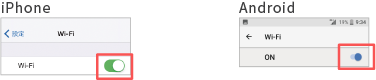
② Turn WiFi on.
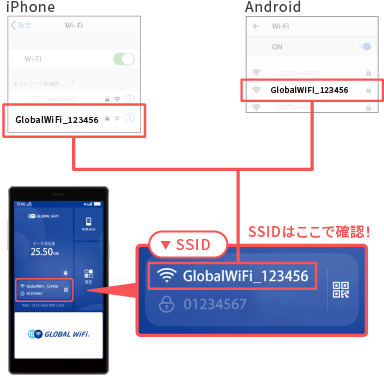
③ From the list of available networks on your smartphone, find and select the SSID shown on the WiFi router screen.
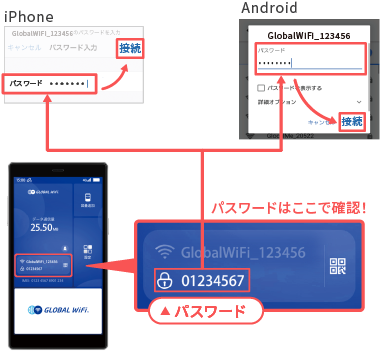
④ Enter the password and select Connect.
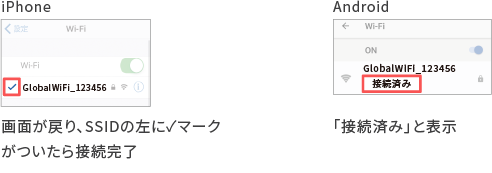
⑤ Once you return to the previous screen and a check mark appears next to the SSID, the connection is complete.
① Turn on the WiFi router and tap the area outlined in red to display the QR code.
Method 2: Connect using the SSID and password
① Go to Home Screen > Settings.
② Turn WiFi on.
③ From the list of available networks on your smartphone, find and select the SSID shown on the WiFi router screen.
④ Enter the password and select Connect.
⑤ Once you return to the previous screen and a check mark appears next to the SSID, the connection is complete.
Was this answer helpful in resolving the issue?
Thank you for your cooperation with the survey
Please share your opinions and feedback
We will use your feedback to help us improve our services.
Submission complete
Thank you for your valuable feedback.